Malware Scams on the Rise
Despite four or more years of public education efforts, malware telephone scams are on the rise. These scams frequently take the form of a phone call from a man claiming to work for Microsoft, who informs the computer owner that his computer is infected with malware. If the homeowner has an Apple computer the scammer hangs up, In the more common case where the homeowner has a Windows computer, he believes the scam artist must work for Microsoft since he knew that he had a Windows computer. Microsoft has also published guidelines to help the public recognize this scam. Read more below including links to major forums that discuss the problem as well as a link to a video recording of a live scammer telephone.
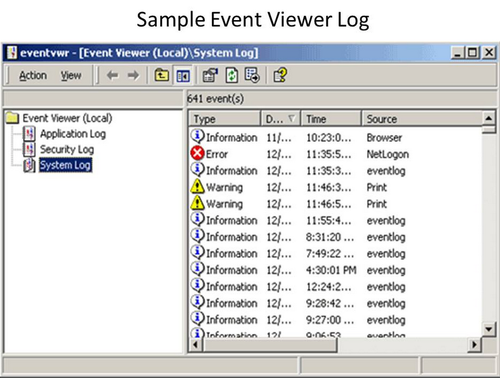
Efforts to engage in the Microsoft computer repair scam have continued well into 2014. The fraud begins when a caller, frequently with a disguised Indian accent, explains to the unsuspecting victim that he works for Microsoft or an affiliate and he has noticed the victim’s PC is sending out a number of error messages.
If the person taking the call believes the caller, he will be instructed to go to his computer and open Event Viewer or other files and folders. Event Viewer is one of many files that contains error messages even when the computer is working normally (see above). In each case the caller will try and make use of the fears and naivety of the computer owner to get him/her to authorize the caller to access the computer, or the recipient’s credit card info. The scam telemarketer is out to make money and desires to acquire the victim’s credit card and bank account information so he can sell him an unnecessary anti-malware program; make bogus charges on the card; gain online access to the computer to implant malware that will hurt it and force the owner purchase a program to solve the problem; employ the malware implant to collect bank and credit card information; or else get the owner to surf to a website, where the scam artist and his colleagues can download malware onto the computer.
This malware telephone scam has been discussed in web forums. You can read some of the best posts and responses at Microsoft virus phone scam . You can also read Microsoft’s suggestions as to how to deal with these hoax calls here: “How to avoid malware phone scams.” You can find a YouTube video of a Microsoft scam phone call. If you think you’ve been infected, you can put the Microsoft anti-malware program on your computer by searching for the Microsoft Security Scanner and the Microsoft Security Essentials. Microsoft Security Essentials has been replaced by Microsoft Defender for Windows 8 owners.
One important point worth making is that most forums will tell you that it is not standard Microsoft practice to call you, their customer, and tell you your computer is infected with malware. That’s not exactly true, as you can read for yourself at the bottom of Microsoft’s avoid phone scam page. What Microsoft actually says is that should a Microsoft employee call you, it will be someone with whom you are already doing business. However, you need to follow their recommendation and disconnect the call and call Microsoft back to ascertain that they did indeed call you, as how else can you tell whether or not to believe the caller who claims to be from Microsoft. Many people have Windows, so the caller may have made a lucky guess when he referred to your Windows program.
For professional computer repair and malware removal in Canoga Park, LA call Planet Cyber at 818-999-9000 or visit our webpage at http://planet-cyber.net/computer-services/areas-serve/computer-repair-canoga-park
NSA Implanting Malware in Thousands of Computers to Carry out Criminal Investigations
As you read this article describing information leaked by fugitive Edward Snowden, you might be shocked and amazed at the advanced techniques the National Security Administration is using for their criminal investigations. The information is amazing as it confirms that a lot of the stories you read in best selling thrillers is real. The facts might make you concerned about the ethics of government surveillance and how we really are living in a post 1984 world. But do think about some of the characters that the NSA is investigating. Not only is this technology real, there are also drug lords smuggling billions of dollars of illegal drugs into America. These massive underworld organizations enact their own justice system that results in large numbers of brutal assassinations. Some of these cartels could even be trying to make deals with 3rd world nations to smuggle suitcase nuclear weapons into America so they can blow up a city or threaten to for a huge ransom. With the techniques you read about in this article, NSA can literally get into their organization in a few minutes. Now, without risking the life of an agent, they can compile names, transactions, even listen in on and watch live conversations between members of the cartel. This is a surveillance level never before achieved that can protect the free world from hideous crimes. Read more…
(first printed in an article on Malware Removal in Tumbler)

When whistle blower Edward Snowden released facts about America’s secret security operations, he made it known that NSA (The National Security Administration ) has been employing automated systems to infect users systems with specially designed “I spy” malware. A computer program called TURBINE has been inserting malware, via fake Facebook platforms, into private computers. Once introduced, the malware can get hold of files stored in the infiltrated computer. Demonstrating spy capabilities similar those described in the thriller novel “The Rembrandt Affair,” NSA malware can record audio with a computer’s microphone; take photos or make videos with a user’s webcam; record target computer’s Internet browsing history, login detail, and passwords used for Web services; record users keystrokes; keep users from surfing on certain web sites; and corrupt files that users try and download.
A Facebook’s spokesman indicated that the social website’s switch from http to https will block NSA’s future ability to use Facebook to enter computers. However, a number of other platforms can still accommodate the spy agencies online efforts to monitor the activities of criminals, drug deals, terrorists and the like.
Malware is defined as a software program that is deliberately employed to the disadvantage of the person whose computer is infected. In cases where malware is used to investigate potentially dangerous or criminal activity, such intervention is justified by legal statute. Governments use malware in spy warfare, and criminals use it to steal credit and other financial information from trusting surfers.
The utilization of malware on the web is widespread and one institute concluded that today the production and use of malware codes may actually exceed that of legitimate software programs and applications. Microsoft has determined that 1 in 14 Internet downloads hold some type of malware.
Malware programs slip in through security defects to invade computers. They may pass in as a “Trojan Horse,” that is secretly embedded in a seemingly harmless program or they may bypass safety filters and invade, unbeknownst, through the backdoor. Today there are numerous excellent anti-malware programs that can be downloaded onto private computers, where they detect and remove invading malware.
This report is presented by Planet Cyber, 818-999-9000, a provider of malware removal and computer repair to Canoga Park, Ca: http://planet-cyber.net/computer-services/areas-serve/computer-repair-canoga-park
How to Secure Your Computer Before Taking it In for Repairs
Its nice and comfortable to think everything and everyone is safe. But hey, you’re not in your mother;s womb anymore. Not all computer technicians are honest, not all are safe. You need to take a reading of your technician. Determine how much you trust him, how private is the information on your PC and determine what steps you must take to protect it when you bring your machine into the shop. Read on.
Securing Your Computer From a Deadly Peril
Your computer faces a potential security peril whenever you bring it into a computer repair shop . The crux of the security issue lies in the fact that the repair technician most likely must have access to your Windows password to complete the repair work. You can lessen the risks by making a temporary account for the computer shop to use; nonetheless, any knowledgeable repairman can easily access login passwords as well as Windows built in file system security! Information kept on the hard drive might also possibly be wiped out because of the requirements of the repair job or because of technician mistake.
How Can You Protect Your Private Files?
- Safeguard the safety of your files by putting them in online storage sites such as Dropbox, OneDrive, or other free or professional cloud based online storage.
- Be certain to make a copy of your hard drive. Once the job’s finished, restore the duplicated hard drives. Be careful though, because the PC hitch may re-emerge if the source was in the hard drive . The best idea, therefore, is to check with your repairman before rebooting your hard drive.
- Private files, including credit card, financial information, tax information, bank account access info, and online money transfer info, etc., should be securely protected. You can protect these files without needing to remove them by employing a free encryption service such as TrueCrypt or AxCrypt (file by file encrypter). Avoid encrypting all your files or the technician may not be able to finish the work. Best is to make one encrypted volume and put all private files in there. A different way to tackle the problem is to remove all personal files to a disk and then copy them back when the computer comes home from the shop.
- Unfortunately, many times your computer will be totally unusable when it needs to go in for repairs. Best strategy, therefore, is to place all files in a protected volume ahead of time. If you didn’t do this, however, you can ,nevertheless, ensure security by removing your hard drive before bringing the Computer to the computer repair store and let the technician put in an alternate hard drive for the duration of the repair.
- Some unprincipled technicians will take out quality computer parts and replace them with less expensive second hand parts. If you have concerns that this could happen to you,, you can protect yourself by making a record of the manufacturer’s serial number for all the important components, including RAM, hard drive, the CPU, RAM slot, processor id, motherboard serial number, memory serial number, DVD ROM, LCD screen, and the WLAN network card. You can get some of this information using the “wmic” command in command prompt, but some you can only find through visual inspection.
Other Ways to Secure Your PC
The types of preventative measures you take will be contingent on the private information stored in your computer as well as how much you place trust in your pc repairman. Alternatives to the above recommendations include:
- Temporarily deactivating Window’s log on password instead of giving the technician your administrative password,
- Giving your tech your phone number and have him call if he needs the password?,
- Having a honest talk with your technician about security issues, and
- the extent to which you trust your technician and deciding to what extent your concerned about security.
Besides guarding your computer’s security, its a good idea to make sure your pc repairman knows exactly what’s wrong with it. Certainly you’ll verbally describe the problem over the phone or at the shop. However, it’s also smart to write a description of the problem. You can also create a file that will appear on reboot, by employing the format %appdata%/Microsoft/windows/start menu/programs/startup/(name of the field).
For on-site, in-house, or quick online computer repairs call the office at 818-999-9000. or visit our website at http://planet-cyber.net/computer-services/areas-serve/computer-repair-canoga-park/ .

